ASTRA / PULSOMETER
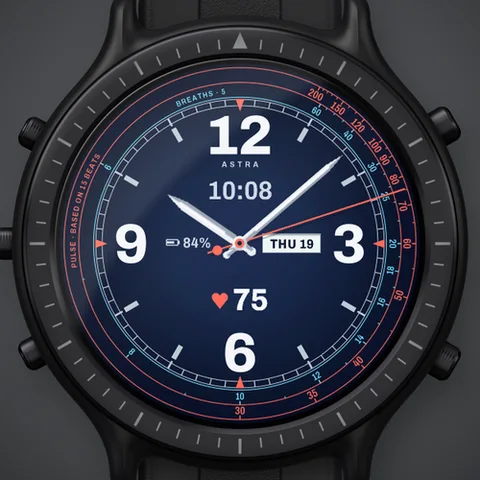
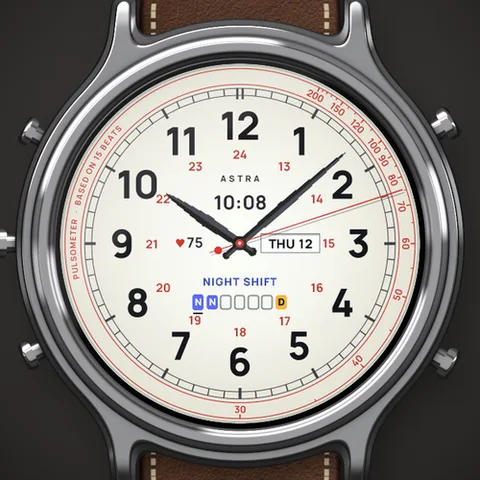
Astra Pulsometer watch face for Garmin. A nurse watch face with a pulsometer scale based on 15 beats and a respiration scale based on 5 breaths, both read by the long red seconds hand, a seconds track with the 15-second quarters marked, four large numerals, 24-hour digital time, heart rate, date and battery; a counting aid, not a medical device. Pro adds a 30-beat scale, military time, a sweeping or hidden seconds hand, two data windows from 9 choices (respiration rate, SpO2, Body Battery and more), five more themes including Night red for night shifts, and the always-on color and date.
THE ORIGINAL DESIGN
Astra Pulsometer watch face, enlarged preview

Pulsometer.Pulsometer and respiration scales for nurses

Count the pulse with the seconds hand.

Astra Pulsometer is a nurse watch face for Garmin: a pulsometer scale based on 15 beats and a respiration scale based on 5 breaths, both read by the red seconds hand, with 24-hour time and heart rate. No phone needed. Free; Pro, 3.99 USD once, adds a 30-beat scale and military time. A counting aid, not a medical device.

Guide: A nurse watch face for Garmin: pulsometer, 24-hour time and your shifts
Designed for Garmin Check your watch
Get Pro on Connect IQ No Garmin Pay? Buy a Pro keyCard, PayPal · $3.99
One-time purchase. No subscription.

Price may vary by country. Final price and taxes are confirmed on Connect IQ.

Meet your next watch face.

Scan to open Astra Pulsometer Pro on the Connect IQ Store.

Open store page

Downloaded directly from Garmin Connect IQ.
No account needed.

A CLOSER LOOK

Count the pulse with the seconds hand.

A nurse watch face with a pulsometer scale based on 15 beats and a respiration scale based on 5 breaths, both read by the long red seconds hand, a seconds track with the 15-second quarters marked, four large numerals, 24-hour digital time, heart rate, date and battery; a counting aid, not a medical device. Pro adds a 30-beat scale, military time, a sweeping or hidden seconds hand, two data windows from 9 choices (respiration rate, SpO2, Body Battery and more), five more themes including Night red for night shifts, and the always-on color and date.

Nurse watch face with a pulsometer and a respiration scale: start when the seconds hand passes 12, stop at the 15th beat or the 5th breath, and the hand points to the rate per minute. Large numerals, 24-hour time and heart rate. A counting aid, not a medical device. Works offline: no companion app, no subscription, no phone needed.

Made for nurses, nursing students, midwives, carers and paramedics who check vital signs by hand: two scales around the dial, read by the long red seconds hand, the outer one for the pulse, the inner one for breathing.

Heart rate, respiration rate, blood oxygen, steps and the other data come from your watch: if it does not give one, the face shows a dash. The seconds hand runs while the watch is awake, so touch the screen to keep it on during a count; sunrise and sunset need a watch that shares them.

From the Pro listing on the Connect IQ Store.

WHAT YOU GET

  • Pulsometer scale based on 15 beats (or 30 beats) and respiration scale based on 5 breaths, both read by the seconds hand
  • Seconds track with the 0, 15, 30 and 45 second marks highlighted
  • Four large numerals (12, 3, 6, 9) and bold sword hands with a light center line
  • Digital time under 12: 14:08, 2:08 as your watch, military 1408, or hidden
  • A large data window at the bottom, heart rate by default, and a small one at 9
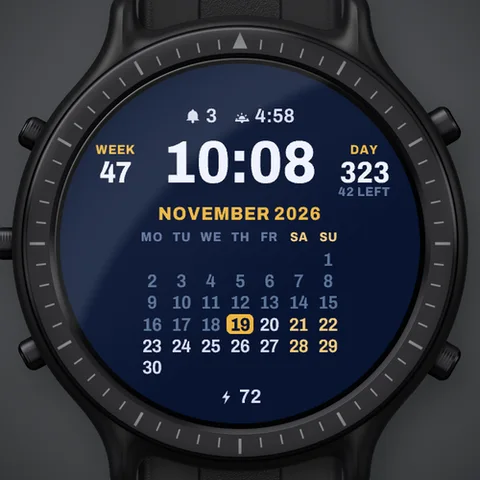
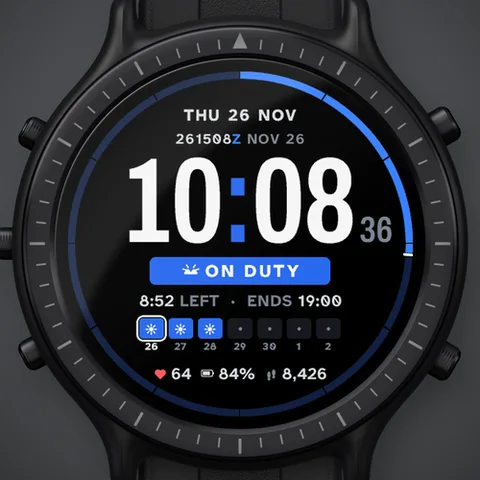
  • Each window from 9 choices: heart rate, respiration rate, blood oxygen (SpO2), steps, Body Battery, sunrise or sunset, temperature, notifications, battery, or nothing
  • Ticking, sweeping or hidden seconds hand; weekday and date, day only, or no date
  • 6 themes: Graphite, Clinical white, Ceil blue, Navy, Teal and Night red, red for night shifts
  • Light backgrounds use more battery on AMOLED screens
  • On touch watches, tap a data window to open it on the watch
  • Always-on (AMOLED): the four numerals in outline and thin hands, shifted against burn-in, never a seconds hand
  • MIP screens, 64 colors: flat colors, the same two scales with fewer numbers, sharp in full sun

QUESTIONS

  • How do I take a pulse? Start as the seconds hand passes 12, count 15 beats, read the number under the hand.
  • And breathing? Count 5 breaths the same way and read the inner scale.
  • Does it need my phone? No, everything runs on the watch.
  • Free or Pro? Free has the Graphite theme and the 15-beat scale; Pro adds 5 themes, the 30-beat scale, military time and your own data.

YOUR FACE. YOUR CHOICE.

Start free. Go a little further.

The Free edition is yours to keep. Choose Pro when you want the extra possibilities.

How Free & Pro work
Your editionFreePro $3.99
AvailabilityAvailable on Connect IQAvailable on Connect IQ
PurchaseFree, no expiryOne-time purchase
Full edition detailsSee Free store listingSee Pro store listing
Get FreeGet Pro

MADE FOR YOUR WATCH

A perfect fit?

Find your exact model. Compatibility is checked separately for each approved edition.

Explore by watch
109 compatible models
Approach S50FreePro
Approach S70 (42mm)FreePro
Approach S70 (47mm)FreePro
Approach S72 - 43 mmFreePro
Approach S72 - 47 mmFreePro
D2 Air X10Free
D2 Air X15FreePro
D2 Mach 1FreePro
D2 Mach 1 ProFreePro
D2 Mach 2FreePro
D2 Mach 2 ProFreePro
Descent G2FreePro
Descent MK2Free
Descent MK2Free
Descent MK3 - 43mmFreePro
Descent MK3i - 51mmFreePro
EnduroFree
EnduroFree
Enduro 2FreePro
Enduro 3FreePro
Enduro 4FreePro
epix (Gen 2)FreePro
epix (Gen 2)FreePro
epix Pro (42mm)FreePro
epix Pro (47mm)FreePro
epix Pro (51mm)FreePro
fēnix 6FreePro
fēnix 6Free
fēnix 6 Dual PowerFree
fēnix 6 ProFreePro
fēnix 6 ProFreePro
fēnix 6 Pro Dual PowerFreePro
fēnix 6 Pro SolarFreePro
fēnix 6 SolarFree
fēnix 6S ProPro
fēnix 6S ProPro
fēnix 6S Pro Dual PowerPro
fēnix 6S Pro SolarPro
fēnix 6X ProFreePro
fēnix 6X ProFreePro
fēnix 7FreePro
fēnix 7FreePro
fēnix 7 ProFreePro
fēnix 7 Pro – Solar Edition (No Wi-Fi)FreePro
fēnix 7SFreePro
fēnix 7SFreePro
fēnix 7S ProFreePro
fēnix 7XFreePro
fēnix 7XFreePro
fēnix 7X ProFreePro
fēnix 7X Pro No Wi-FiFreePro
fēnix 8 AMOLED (43mm)FreePro
fēnix 8 AMOLED (47mm/51mm)FreePro
fēnix 8 ProFreePro
fēnix 8 Solar (47mm)FreePro
fēnix 8 Solar (51mm)FreePro
fenix 9 - 43 mmFreePro
fenix 9 – 47 mmFreePro
fenix 9 Pro - 43 mmFreePro
fenix 9 Pro - 47 mmFreePro
fenix 9 Pro - 51 mmFreePro
fenix 9 Pro - Solar 47 mmFreePro
fenix 9 Pro - Solar 51 mmFreePro
fēnix EFreePro
Forerunner 165FreePro
Forerunner 165 MusicFreePro
Forerunner 170FreePro
Forerunner 170 MusicFreePro
Forerunner 255FreePro
Forerunner 255 MusicFreePro
Forerunner 255SFreePro
Forerunner 255S MusicFreePro
Forerunner 265FreePro
Forerunner 265SFreePro
Forerunner 570 - 42mmFreePro
Forerunner 570 - 47mmFreePro
Forerunner 70FreePro
Forerunner 955 Dual PowerFreePro
Forerunner 965FreePro
Forerunner 970FreePro
Instinct 3 – 45 mm, AMOLEDFreePro
Instinct 3 – 50 mm, AMOLEDFreePro
MARQ (Gen 2)FreePro
MARQ Adventurer (Gen 3)FreePro
MARQ Commander (Gen 2) – Carbon EditionFreePro
MARQ Aviator (Gen 2)FreePro
Mercedes-Benz Venu 2FreePro
Mercedes-Benz Venu 2SFreePro
quatix 6Free
quatix 6XFree
tactix 7FreePro
tactix 7 – AMOLED EditionFreePro
tactix 8 – 47 mm, AMOLEDFreePro
tactix 8 – 51 mm, SolarFreePro
Venu 2FreePro
Venu 2FreePro
Venu 2 PlusFreePro
Venu 2 PlusFreePro
Venu 2SFreePro
Venu 2SFreePro
Venu 3FreePro
Venu 3SFreePro
Venu 4 – 41 mmFreePro
Venu 4 – 45 mmFreePro
vívoactive 5FreePro
vívoactive 6FreePro

GOOD TO KNOW

The little details.

Ask the studio
How do I take a pulse with it?

Start as the seconds hand passes 12, count 15 beats and read the number under the hand on the outer scale: that is the rate per minute. The Pro adds a scale based on 30 beats. The seconds hand runs while the watch is awake, so touch the screen to keep it on during a count.

And the respiratory rate?

Count 5 breaths the same way from 12 and read the inner scale. The seconds track also marks the four 15-second quarters, for the classic count times four.

Is there a theme for night shifts?

Yes, in the Pro: Night red, among 5 more themes (Clinical white, Ceil blue, Navy and Teal too). The Free has the Graphite theme, a matte dark dial with a red pulse scale and a cyan respiration scale. Light backgrounds use more battery on AMOLED screens.

Does it measure my patient's pulse?

No. It is a counting aid for a manual count, not a medical device. The heart rate at the bottom is yours, from your watch; the Pro can also show your respiration rate, blood oxygen (SpO2) or Body Battery from your watch in its 2 data windows, a dash if your watch does not give one.

Which Garmin watches can run Astra Pulsometer?

The Free edition runs on 105 Garmin watch models and the Pro on 99, among them the fēnix 8, Forerunner 970, Venu 4, vívoactive 6 and Instinct 3. Search your exact model in the compatibility list on this page: the Connect IQ app only offers the face to a supported watch.

Is Astra Pulsometer Pro a subscription?

No. Astra Pulsometer Pro is a one-time purchase of $3.99 through the Garmin Connect IQ Store, with no renewal. The Free edition never expires. The store shows the final price for your country.

Can I unlock Astra Pulsometer Pro without Garmin Pay?

Yes. Install the Free edition, then buy the Astra Pulsometer Pro key (3.99 USD, one-time) on the Pro key page with the 8-character watch code shown under Pro key in the face settings. Enter the 10-character key there and the Free switches to Pro. See unlock Pro with a key.

How do I install Pulsometer?

Choose an available edition above to open its Connect IQ page. Select a compatible watch in the Connect IQ app, install the face and sync your watch. Then select the new face on your watch.

Where do I change the settings?

Open Connect IQ, find the installed watch face under My Device, and open Settings. Available options depend on the face and edition. Save the changes and sync your watch.

Page updated on , from the current Connect IQ listings and the face itself.

A LITTLE HELP GOES A LONG WAY

New face. Easy start.

From your first install to your favorite settings. Make yourself at home.

Explore the guides