ASTRA / HALLOWEEN
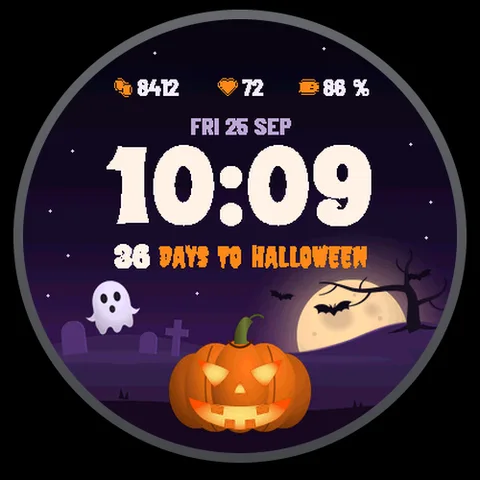
Astra Halloween watch face for Garmin. A pumpkin-and-ghost design for the Halloween season.
THE ORIGINAL DESIGN
Astra Halloween watch face, enlarged preview
ANIMATED WATCH FACEGood little things

Halloween.

A seasonal little spirit.

A pumpkin-and-ghost design for the Halloween season.

5.0 (18 Free store reviews)

Designed for Garmin Check your watch
Get Free on Connect IQ
No expiry. No purchase required.

Meet your next watch face.

Scan to open Astra Halloween Free on the Connect IQ Store.

Open store page

Downloaded directly from Garmin Connect IQ.
No account needed.

A CLOSER LOOK

A seasonal little spirit.

A pumpkin-and-ghost design for the Halloween season.

NEW: NOW ANIMATED. Raise your wrist and the scene wakes up: the pumpkin flickers to life, a bat crosses the moon and the little ghost peeks out from behind a tombstone to wave at you. On 31 October, a special Halloween night with an orange full moon, seven bats, two small pumpkins and a black cat on its broom. After Halloween: falling autumn leaves and your next sunrise or sunset. Bigger time, date and data. The animation can be turned off.

Halloween watch face with a glowing carved pumpkin, a big harvest moon and bats flying over a haunted hill. A spooky October night scene, illustrated from scratch, with a large clear time, a countdown to Halloween and 5 themes, from Classic orange to a pale blue Ghost night.

Good to know: weather, sunrise and sunset data need a Garmin weather location, synced from the phone. The countdown and the settings are in English and French.

From the Free listing on the Connect IQ Store.

THE SCENE

  • A purple-to-black night sky with stars and a big harvest moon rising behind the hill in a soft glow
  • Three bats, a bare twisted tree against the moon, three moonlit tombstones, a little sheet ghost floating above them and low mist
  • A large jack-o'-lantern in the foreground with a curled stem: its carved eyes, nose and mouth glow deep orange at the edges and bright yellow in the middle

WHAT YOU GET

  • Large, very legible time in a bold display font with a spooky touch, 12 h or 24 h following your watch setting
  • Date line (e.g. FRI 25 SEP) with day and month names in your watch language
  • Line under the time: countdown when 1 to 99 days remain ("14 DAYS TO HALLOWEEN"), "HAPPY HALLOWEEN" on 31 October, your next sunrise or sunset the rest of the year. Countdown can be turned off
  • 3 data slots at the top with 35 choices each: steps, distance, floors, calories, heart rate, Body Battery, stress, Pulse Ox, battery, notifications, 2nd time zone, weather, sunrise, sunset, altitude, recovery time, moon phase and more
  • 5 colour themes, all included, each one recolouring the whole scene: Classic (orange and purple), Toxic (radioactive green pumpkin and lime glow), Blood moon (red moon, red night), Ghost (pale blue night, white pumpkin with a blue glow) and Midnight (monochrome)
  • Touch and hold a data slot to open the matching Garmin screen on touch watches
  • Always-on on AMOLED watches: the jack-o'-lantern glowing in the dark, outlined time, date and a small crescent moon in dim colours, shifted every minute
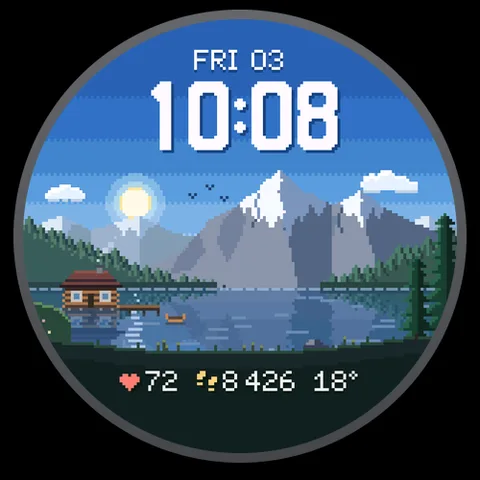
  • MIP watches (fēnix 7 family, Forerunner 255 and 955, fēnix 8 Solar, Enduro 3) get their own 64-colour version of the scene for each theme, with a retro pixel-art look (a still scene, without animation)
  • Settings on the watch (Customize menu) or in the Connect IQ app: Animation (On wake or Off), theme, data, countdown, 2nd time zone offset

YOUR FACE. YOUR CHOICE.

Yours to keep.

The Free edition is available directly on the Connect IQ Store.

How Free & Pro work
Your editionFree
AvailabilityAvailable on Connect IQ
PurchaseFree, no expiry
Full edition detailsSee Free store listing
Get Free

MADE FOR YOUR WATCH

A perfect fit?

Find your exact model. Compatibility is checked separately for each approved edition.

Explore by watch
73 compatible models
Approach S70 (42mm)Free
Approach S70 (47mm)Free
Approach S72 - 43 mmFree
Approach S72 - 47 mmFree
D2 Air X15Free
D2 Mach 1 ProFree
D2 Mach 2Free
D2 Mach 2 ProFree
Enduro 2Free
Enduro 3Free
Enduro 4Free
epix (Gen 2)Free
epix (Gen 2)Free
epix Pro (42mm)Free
epix Pro (47mm)Free
epix Pro (51mm)Free
fēnix 7Free
fēnix 7Free
fēnix 7 ProFree
fēnix 7XFree
fēnix 7XFree
fēnix 7X ProFree
fēnix 8 AMOLED (43mm)Free
fēnix 8 AMOLED (47mm/51mm)Free
fēnix 8 ProFree
fēnix 8 Solar (47mm)Free
fēnix 8 Solar (51mm)Free
fenix 9 - 43 mmFree
fenix 9 – 47 mmFree
fenix 9 Pro - 43 mmFree
fenix 9 Pro - 47 mmFree
fenix 9 Pro - 51 mmFree
fenix 9 Pro - Solar 47 mmFree
fenix 9 Pro - Solar 51 mmFree
fēnix EFree
Forerunner 165Free
Forerunner 165 MusicFree
Forerunner 170Free
Forerunner 170 MusicFree
Forerunner 255Free
Forerunner 255 MusicFree
Forerunner 265Free
Forerunner 265SFree
Forerunner 570 - 42mmFree
Forerunner 570 - 47mmFree
Forerunner 955 Dual PowerFree
Forerunner 965Free
Forerunner 970Free
Instinct 3 – 45 mm, AMOLEDFree
Instinct 3 – 50 mm, AMOLEDFree
MARQ (Gen 2)Free
MARQ Commander (Gen 2) – Carbon EditionFree
MARQ Aviator (Gen 2)Free
Mercedes-Benz Venu 2Free
Mercedes-Benz Venu 2SFree
tactix 7Free
tactix 7 – AMOLED EditionFree
tactix 8 – 47 mm, AMOLEDFree
tactix 8 – 51 mm, SolarFree
Venu 2Free
Venu 2Free
Venu 2 PlusFree
Venu 2 PlusFree
Venu 2SFree
Venu 2SFree
Venu 3Free
Venu 3SFree
Venu 4 – 41 mmFree
Venu 4 – 45 mmFree
vívoactive 5Free
vívoactive 6Free

GOOD TO KNOW

The little details.

Ask the studio
Which Garmin watches can run Astra Halloween?

Astra Halloween runs on 73 Garmin watch models, among them the fēnix 8, Forerunner 970, Venu 4, vívoactive 6 and Instinct 3. Search your exact model in the compatibility list on this page: the Connect IQ app only offers the face to a supported watch.

Is Astra Halloween free?

Yes. Astra Halloween is free on the Garmin Connect IQ Store, with no expiry and no purchase inside the face.

How do I install Halloween?

Choose an available edition above to open its Connect IQ page. Select a compatible watch in the Connect IQ app, install the face and sync your watch. Then select the new face on your watch.

When does the animation play?

Animation behavior depends on your watch and the edition. Check the settings in Connect IQ and the edition description on its store page. Animation is limited while the watch is in its low-power state.

Where do I change the settings?

Open Connect IQ, find the installed watch face under My Device, and open Settings. Available options depend on the face and edition. Save the changes and sync your watch.

A LITTLE HELP GOES A LONG WAY

New face. Easy start.

From your first install to your favorite settings. Make yourself at home.

Explore the guides