ASTRA / GLOBE
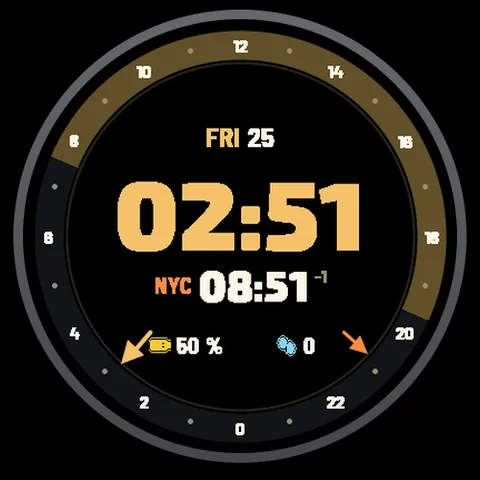
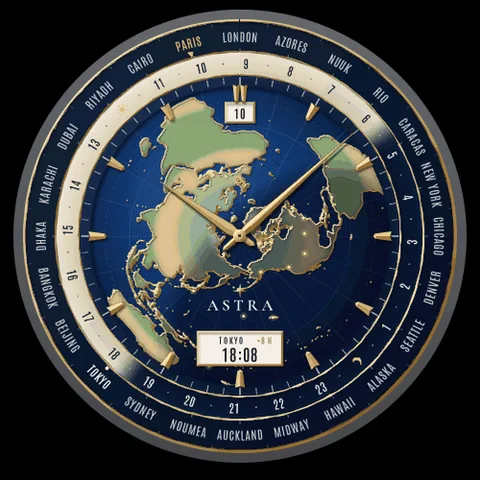
Astra Globe watch face for Garmin. A world-time design for days that span more than one time zone.
THE ORIGINAL DESIGN
Astra Globe watch face, enlarged preview

Globe.Two time zones watch face for Garmin

Two places. One glance.

Astra Globe puts a second time zone on your Garmin watch face: local time in large digits, the other zone below with your own label, and a 24-hour day and night ring. The second zone is a fixed UTC offset, half-hour and 45-minute zones included, so you change it when daylight saving moves. Free, or Pro at 3.99 USD.

Guide: Two or more time zones on a Garmin watch face, with daylight saving right
Designed for Garmin Check your watch
Get Pro on Connect IQ No Garmin Pay? Buy a Pro keyCard, PayPal · $3.99
One-time purchase. No subscription.

Price may vary by country. Final price and taxes are confirmed on Connect IQ.

Meet your next watch face.

Scan to open Astra Globe Pro on the Connect IQ Store.

Open store page

Downloaded directly from Garmin Connect IQ.
No account needed.

A CLOSER LOOK

Two places. One glance.

A world-time design for days that span more than one time zone.

Dual time watch face with world time at a glance: a 24-hour ring shows day and night, your local time and a second time zone, like a GMT watch made for travellers. Your local time sits in large digits in the centre, the second time zone just below it with the label you choose (NYC, TOKYO, HOME…).

Good to know: the day and night shading uses your Garmin weather location, synced from the phone.

From the Pro listing on the Connect IQ Store.

WHAT YOU GET

  • 24-hour ring with hour numerals, light for daytime and dark for night from today's sunrise and sunset
  • A marker for your local time and a second coloured marker for the second time zone
  • Second time zone with your own label and any UTC offset, including half-hour and 45-minute zones
  • Three data places: top line (date), bottom left and bottom right (battery and steps)
  • 36 data types: heart rate, resting HR, 4-hour heart rate graph, Body Battery, stress, Pulse Ox, steps, distance, floors, calories, intensity minutes, recovery time, weather, temperature, feels like, high/low, wind, rain chance, sunrise, sunset, moon phase, notifications, alarms, date, week number, second time zone, altitude, pressure, phone, do not disturb
  • 15 colour themes, gold by default, with amber, orange, pure black, pure white and more; dynamic colours by value; always-on display
  • Settings on the watch (hold to customise) or in the Connect IQ app; the second zone offset and label are set in the Connect IQ app
  • Tap a data place to open the matching Garmin app on touch watches

QUESTIONS

  • Can I set any time zone? Yes: any UTC offset, half-hour and 45-minute zones included, with your own label (NYC, TOKYO, HOME…), in the Connect IQ app.
  • Where does the day and night shading come from? From your Garmin weather location, synced from the phone.
  • Free or Pro? Free: 5 themes and 34 data types. Pro: 15 themes, dynamic colours, the heart rate graph and all 36 data types.

YOUR FACE. YOUR CHOICE.

Start free. Go a little further.

The Free edition is yours to keep. Choose Pro when you want the extra possibilities.

How Free & Pro work
Your editionFreePro $3.99
AvailabilityAvailable on Connect IQAvailable on Connect IQ
PurchaseFree, no expiryOne-time purchase
Full edition detailsSee Free store listingSee Pro store listing
Get FreeGet Pro

MADE FOR YOUR WATCH

A perfect fit?

Find your exact model. Compatibility is checked separately for each approved edition.

Explore by watch
74 compatible models
Approach S70 (42mm)FreePro
Approach S70 (47mm)FreePro
Approach S72 - 43 mmFreePro
Approach S72 - 47 mmFreePro
D2 Air X15FreePro
D2 Mach 1 ProFreePro
D2 Mach 2FreePro
D2 Mach 2 ProFreePro
Enduro 2FreePro
Enduro 3FreePro
Enduro 4FreePro
epix (Gen 2)FreePro
epix (Gen 2)FreePro
epix Pro (42mm)FreePro
epix Pro (47mm)FreePro
epix Pro (51mm)FreePro
fēnix 7FreePro
fēnix 7FreePro
fēnix 7 ProFreePro
fēnix 7XFreePro
fēnix 7XFreePro
fēnix 7X ProFreePro
fēnix 8 AMOLED (43mm)FreePro
fēnix 8 AMOLED (47mm/51mm)FreePro
fēnix 8 ProFreePro
fēnix 8 Solar (47mm)FreePro
fēnix 8 Solar (51mm)FreePro
fenix 9 - 43 mmFreePro
fenix 9 – 47 mmFreePro
fenix 9 Pro - 43 mmFreePro
fenix 9 Pro - 47 mmFreePro
fenix 9 Pro - 51 mmFreePro
fenix 9 Pro - Solar 47 mmFreePro
fenix 9 Pro - Solar 51 mmFreePro
fēnix EFreePro
Forerunner 165FreePro
Forerunner 165 MusicFreePro
Forerunner 170FreePro
Forerunner 170 MusicFreePro
Forerunner 255FreePro
Forerunner 255 MusicFreePro
Forerunner 265FreePro
Forerunner 265SFreePro
Forerunner 570 - 42mmFreePro
Forerunner 570 - 47mmFreePro
Forerunner 955 Dual PowerFreePro
Forerunner 965FreePro
Forerunner 970FreePro
Instinct 3 – 45 mm, AMOLEDFreePro
Instinct 3 – 50 mm, AMOLEDFreePro
MARQ (Gen 2)FreePro
MARQ Adventurer (Gen 3)FreePro
MARQ Commander (Gen 2) – Carbon EditionFreePro
MARQ Aviator (Gen 2)FreePro
Mercedes-Benz Venu 2FreePro
Mercedes-Benz Venu 2SFreePro
tactix 7FreePro
tactix 7 – AMOLED EditionFreePro
tactix 8 – 47 mm, AMOLEDFreePro
tactix 8 – 51 mm, SolarFreePro
Venu 2FreePro
Venu 2FreePro
Venu 2 PlusFreePro
Venu 2 PlusFreePro
Venu 2SFreePro
Venu 2SFreePro
Venu 3FreePro
Venu 3SFreePro
Venu 4 – 41 mmFreePro
Venu 4 – 45 mmFreePro
vívoactive 5FreePro
vívoactive 6FreePro

GOOD TO KNOW

The little details.

Ask the studio
Does the second time zone follow daylight saving time?

No. Astra Globe uses a fixed UTC offset from -12 to +14 hours, plus 15, 30 or 45 minutes. When the other city changes its clocks, change the offset in the Connect IQ app. For a second zone that changes by itself, Astra Tactical GMT picks a city and follows its daylight saving rules.

Is the second time zone in the Free edition?

Yes. The Free has the 24-hour ring, your local time and the second zone with your own label, 5 themes and 34 data types. The Pro adds 15 themes, dynamic colours by value, the 4-hour heart rate graph, moon phase and all 36 data types.

What does +1 next to the second time mean?

The other zone is already on the next day compared with your local date. You see -1 when it is still on the previous day. It saves you the mental arithmetic when you call or message someone far away.

How does the ring know when it is day or night?

The light and dark parts of the 24-hour ring come from today's sunrise and sunset. The face reads them from the watch first, then from your Garmin weather location synced from the phone. No GPS permission is requested.

How long can the second zone name be?

Up to 8 characters, set in the Connect IQ app (for example NYC, TOKYO or HOME). It starts as UTC with a zero offset, which pilots and anyone working on UTC can simply leave as it is.

Which Garmin watches can run Astra Globe?

Both editions run on the same 74 Garmin watch models, among them the fēnix 8, Forerunner 970, Venu 4, vívoactive 6 and Instinct 3. Search your exact model in the compatibility list on this page: the Connect IQ app only offers the face to a supported watch.

Is Astra Globe Pro a subscription?

No. Astra Globe Pro is a one-time purchase of $3.99 through the Garmin Connect IQ Store, with no renewal. The Free edition never expires. The store shows the final price for your country.

Can I unlock Astra Globe Pro without Garmin Pay?

Yes. Install the Free edition, then buy the Astra Globe Pro key (3.99 USD, one-time) on the Pro key page with the 8-character watch code shown under Pro key in the face settings. Enter the 10-character key there and the Free switches to Pro. See unlock Pro with a key.

How do I install Globe?

Choose an available edition above to open its Connect IQ page. Select a compatible watch in the Connect IQ app, install the face and sync your watch. Then select the new face on your watch.

Where do I change the settings?

Open Connect IQ, find the installed watch face under My Device, and open Settings. Available options depend on the face and edition. Save the changes and sync your watch.

Page updated on , from the current Connect IQ listings and the face itself.

A LITTLE HELP GOES A LONG WAY

New face. Easy start.

From your first install to your favorite settings. Make yourself at home.

Explore the guides