ASTRA / MARBLE
Astra Marble for Garmin watches: 200 Tilt Maze Levels
THE APP
Astra Marble, enlarged icon

Marble.

200 Tilt Maze Levels

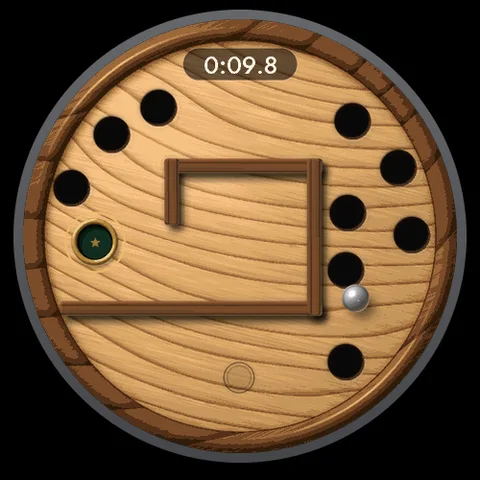
A polished steel marble rolls on a round varnished oak board, and the turned walnut rim is the edge of your watch. Tilt your wrist to guide it to the brass cup and avoid the holes drilled in the wood. Real physics: inertia, a soft knock on the walls, and the lip of a hole that pulls the marble in when you pass too close. If you grew up with the wooden tilting labyrinth, you will feel at home.

Free edition to keep Check your watch
Get Pro on Connect IQ
One-time purchase. No subscription.

Price may vary by country. Final price and taxes are confirmed on Connect IQ.

Open it on your phone.

Scan to open Astra Marble Pro on the Connect IQ Store.

Open store page

Installed from the official Connect IQ Store.
One-time Pro purchase, no subscription.

IN DETAIL

200 Tilt Maze Levels

From the Pro listing on the Connect IQ Store.

WHAT YOU GET

  • 200 handmade levels in 10 worlds, each with its own mechanism: Workshop (walls and holes), Bridges (narrow planks over gaps), Ice (the marble slides), Magnets (attract or repel), Ferries (moving platforms over gaps), Gates (doors that open in rhythm), Hourglass (beat the timer), Springs (bumpers), Turntables (spinning discs), Grand Tour (everything mixed)
  • 1 to 3 stars per level on time, falls included, and your best time for every level. The next level opens as soon as you finish one; a new world opens at 30 stars in the previous one
  • 6 boards: Oak, Walnut, Marble, Frost, Steel, Neon. 5 marbles: Steel, Brass, Copper, Onyx, Glass. Purely visual: the physics stays the same, so your records stay comparable
  • Three ways to play: tilt (accelerometer, calibrated in 1.2 s at the start of each level with a spirit level), buttons (UP and DOWN aim a slope arrow, hold START to tilt, release to brake) or touch (hold your finger down, the marble follows it)
  • Sensitivity in 5 steps; sound and vibration can be switched off separately
  • A fall sends you back to the start (or to the last checkpoint on long levels) and the timer keeps running
  • Pause at any time with BACK; hold UP to recalibrate
  • Watches without a tilt sensor switch to buttons automatically
  • MIP screens, 64 colors (fēnix 7, 7 Pro, Forerunner 255, 255 Music, 955): flat colors, the same levels and the same physics

MADE FOR YOUR WATCH

Does it run on your watch?

Find your exact model. Compatibility is checked separately for the Free and Pro editions.

69 compatible models
D2 Air X15FreePro
D2 Mach 1 ProFreePro
Enduro 2FreePro
Enduro 3FreePro
Enduro 4FreePro
epix (Gen 2)FreePro
epix (Gen 2)FreePro
epix Pro (42mm)FreePro
epix Pro (47mm)FreePro
epix Pro (51mm)FreePro
fēnix 7FreePro
fēnix 7FreePro
fēnix 7 ProFreePro
fēnix 7 Pro – Solar Edition (No Wi-Fi)FreePro
fēnix 7SFreePro
fēnix 7SFreePro
fēnix 7S ProFreePro
fēnix 7XFreePro
fēnix 7XFreePro
fēnix 7X ProFreePro
fēnix 7X Pro No Wi-FiFreePro
fēnix 8 AMOLED (43mm)FreePro
fēnix 8 AMOLED (47mm/51mm)FreePro
fēnix 8 ProFreePro
fēnix 8 Solar (47mm)FreePro
fēnix 8 Solar (51mm)FreePro
fenix 9 - 43 mmFreePro
fenix 9 – 47 mmFreePro
fenix 9 Pro - 43 mmFreePro
fenix 9 Pro - 47 mmFreePro
fenix 9 Pro - 51 mmFreePro
fenix 9 Pro - Solar 47 mmFreePro
fenix 9 Pro - Solar 51 mmFreePro
Forerunner 165FreePro
Forerunner 165 MusicFreePro
Forerunner 170FreePro
Forerunner 170 MusicFreePro
Forerunner 255FreePro
Forerunner 255 MusicFreePro
Forerunner 255SFreePro
Forerunner 255S MusicFreePro
Forerunner 265FreePro
Forerunner 265SFreePro
Forerunner 570 - 42mmFreePro
Forerunner 570 - 47mmFreePro
Forerunner 955 Dual PowerFreePro
Forerunner 965FreePro
Forerunner 970FreePro
Instinct 3 – 45 mm, AMOLEDFreePro
Mercedes-Benz Venu 2FreePro
Mercedes-Benz Venu 2SFreePro
tactix 7FreePro
tactix 7 – AMOLED EditionFreePro
tactix 8 – 47 mm, AMOLEDFreePro
tactix 8 – 51 mm, SolarFreePro
Venu 2FreePro
Venu 2FreePro
Venu 2 PlusFreePro
Venu 2 PlusFreePro
Venu 2SFreePro
Venu 2SFreePro
Venu 3FreePro
Venu 3SFreePro
Venu 4 – 41 mmFreePro
Venu 4 – 45 mmFreePro
vívoactive 5FreePro
vívoactive 6FreePro

GOOD TO KNOW

Before you install.

Ask the studio
How do I install Marble?

Choose an edition above to open its Connect IQ page, select your watch in the Connect IQ app and sync. On the watch, open the app from your activities and apps list.

Do I need a subscription?

No. The Free edition costs nothing and never expires. The Pro edition is a one-time purchase through Garmin Connect IQ, linked to your Garmin account.

Does the game drain the battery?

The game only runs while it is open on your watch, like any other app. Close it with the back button when you are done.